Elasticsearch 1.X
这个文档大约2014年在写的,只是修改了下版本号,这个文档写的非常简单,后面有空再发。
elasticsearch和solr都非常适合拿来做分布式全文索引,可以轻松的处理海量数据。
最近一年也没咋发文章,攒了很多都被弄丢掉了...
elasticsearch是一个基于Lucene的搜索服务器。它提供了一个分布式多用户能力的全文搜索引擎,基于RESTful web接口。使用elasticsearch可以快速的构建一个全文检索集群帮助你实时搜索。
一、下载安装
wget https://download.elasticsearch.org/elasticsearch/elasticsearch/elasticsearch-1.7.3.zip
unzip elasticsearch-1.7.3.zip
cp elasticsearch-1.7.3 elasticsearch-1.7.3-2
单机配置:
启动:
./bin/elasticsearch(windows下双击elasticsearch.bat)后台方式启动:
./bin/elasticsearch -d启动成功后会监听:9200(web api端)、9300(socket api)、54328(zen discovery udp广播)
二:中文分词
在默认情况下elasticsearch是不支持中文分词的,所以需要自行安装分词器以便于检索中文字符。这里采用elasticsearch-analysis-ik+mmseg用于中文分词索引。
1、下载并安装maven
wget http://apache.communilink.net/maven/maven-3/3.2.5/binaries/apache-maven-3.2.5-bin.zip配置环境变量:
vim ~/.bash_profile末尾添加:
export M2_HOME=/data/apache-maven-3.2.5
PATH=$PATH:$JAVA_HOME/bin:$M2_HOME/bin
2、下载ik和mmseg插件
解压elasticsearch-analysis-ik-master.zip
编辑elasticsearch-analysis-ik-master/pom.xml中的elasticsearch版本号为1.42(安装的es版本)
3、安装elasticsearch-analysis-ik
构建elasticsearch-analysis-ik jar
cd elasticsearch-analysis-ik-master
mvn clean package
构建完成后复制target目录下生成的elasticsearch-analysis-ik-1.2.9.jar到elasticsearch安装目录的lib文件夹。复制elasticsearch-analysis-ik-master/config/ik文件夹到elasticsearch安装目录的config文件夹。
配置elasticsearch-1.4.2/config/elasticsearch.yml
添加以下配置:
index:
  analysis:
    analyzer:
      ik:
          alias: [ik_analyzer]
          type: org.elasticsearch.index.analysis.IkAnalyzerProvider
      ik_max_word:
          type: ik
          use_smart: false
      ik_smart:
          type: ik
          use_smart: true
或者:
index.analysis.analyzer.ik.type : "ik"4、安装HttpClient
wget http://apache.01link.hk//httpcomponents/httpclient/binary/httpcomponents-client-4.3.6-bin.zip
解压后复制httpcomponents-client-4.3.6 /lib下的fluent-hc-4.3.6.jar、httpclient-4.3.6.jar、httpclient-cache-4.3.6.jar、httpcore-4.3.3.jar、httpmime-4.3.6.jar到elasticsearch安装目录的lib文件夹。
5、安装elasticsearch-analysis-mmseg
- 解压elasticsearch-analysis-mmseg-master
- mvn构建elasticsearch-analysis-mmseg
- 在elasticsearch安装目录创建plugins目录,然后在plugins下创建analysis-mmseg。
- 复制构建后的elasticsearch-analysis-mmseg-1.2.2.jar文件到analysis-mmseg目录。
- 复制elasticsearch-analysis-mmseg-master/config/下的mmseg文件夹到elasticsearch安装目录的config文件夹。
三:Nginx HttpBasic认证
Elasticsearch启动后默认监听9200(netty-web端口)、9300(socket transport)。9200端口提供了RESTFUL查询支持比较方便。这里配置nginx代理为es的web接口添加负载和基础认证。
1、安装nginx
yum -y install nginx
service nginx start
chkconfig nginx on
2、访问配置
vim /etc/nginx/conf.d/es.conf添加:
server {
    server_name es.xxx.com;
    access_log  logs/es.access.log  main;
    listen 80;
    location / {
        proxy_pass http://localhost:9200;
        auth_basic "secret";
        auth_basic_user_file /etc/nginx/conf.d/es.db;
    }

    location /status {
        stub_status on;
        auth_basic "NginxStatus";
    }
}
下载htpasswd脚本,根据提示生成db文件:
wget http://p2j.cn/tools/htpasswd.sh
如此配置只能保证9200端口安全,但是9300依旧可能存在问题。加上iptables或者安装es插件。如果确认只对内网开放可以配置(network.bind_host为内网IP)。
四:集群
Elasticsearch会根据集群名称自动加入新的集群,所以只要保证集群名一样就行了。
1、集群配置
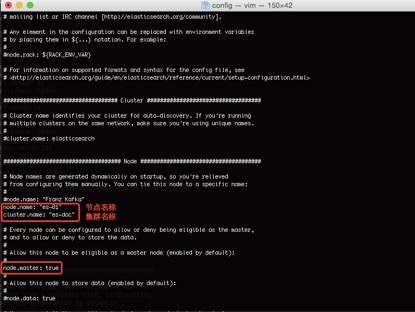
核心配置文件: config/elasticsearch.yml
node.name: "es-01"
cluster.name: "es-doc"
node.master: true 是否设置为主节点,设置es-01为主节点。不设置也会自动选举。
复制已配置好的elasticsearch-1.4.2目录为elasticsearch-1.4.2-2(或者复制已配置好的elasticsearch-1.4.2目录到内网其他服务器)
修改: elasticsearch-1.4.2-2/config/elasticsearch.yml
修改节点配置:
node.name: "es-02"
cluster.name: "es-doc"
注释掉:#node.master: true
五:测试
启动两个elasticsearch,因为配置了基础认证所以访问的时候带上密码。
1、查看集群状态
http://账号:密码@localhost:6200/_cluster/health?pretty
可以看到:
"number_of_nodes" : 2,
"number_of_data_nodes" : 2,
2、创建索引
curl -XPUT http://localhost:9200/index3、创建映射
curl -XPOST http://localhost:9200/index/fulltext/_mapping -d'
{
    "fulltext": {
             "_all": {
            "indexAnalyzer": "ik",
            "searchAnalyzer": "ik",
            "term_vector": "no",
            "store": "false"
        },
        "properties": {
            "content": {
                "type": "string",
                "store": "no",
                "term_vector": "with_positions_offsets",
                "indexAnalyzer": "ik",
                "searchAnalyzer": "ik",
                "include_in_all": "true",
                "boost": 8
            }
        }
    }
}'
4、添加索引
curl -XPOST http://localhost:9200/index/fulltext/1 -d'
{"content":"美国留给伊拉克的是个烂摊子吗"}'
curl -XPOST http://localhost:9200/index/fulltext/2 -d'
{"content":"公安部:各地校车将享最高路权"}'
curl -XPOST http://localhost:9200/index/fulltext/3 -d'
{"content":"中韩渔警冲突调查:韩警平均每天扣1艘中国渔船"}'
curl -XPOST http:// localhost:9200/index/fulltext/4 -d'
{"content":"中国驻洛杉矶领事馆遭亚裔男子枪击 嫌犯已自首"}
5、搜索和搜索结果高亮
curl -XPOST http://localhost:9200/index/fulltext/_search  -d'
{
    "query" : { "term" : { "content" : "中国" }},
    "highlight" : {
        "pre_tags" : ["", ""],
        "post_tags" : ["", ""],
        "fields" : {
            "content" : {}
        }
    }
}
'
六:Java客户端
1、批量导入 添加elasticsearch-1.4.2.jar和lucene-core-4.10.2.jar
测试HtmlDoc.java:
import java.io.File;
import java.io.FileInputStream;
import java.io.UnsupportedEncodingException;
import java.util.HashSet;
import java.util.LinkedHashMap;
import java.util.Map;
import java.util.Set;
import net.sf.json.JSONObject;
import org.apache.commons.io.IOUtils;
import org.elasticsearch.action.bulk.BulkRequestBuilder;
import org.elasticsearch.action.bulk.BulkResponse;
import org.elasticsearch.client.Client;
import org.elasticsearch.client.transport.TransportClient;
import org.elasticsearch.common.settings.ImmutableSettings;
import org.elasticsearch.common.settings.Settings;
import org.elasticsearch.common.transport.InetSocketTransportAddress;
import org.javaweb.utils.HttpRequestUtils;


public class HtmlDoc {

  public static void addIndex(Set<map<string,string>> ls){
    try {
      Settings settings = ImmutableSettings.settingsBuilder().put("cluster.name", "es-doc").put("client.transport.sniff", true).build();
      Client client = new TransportClient(settings).addTransportAddress(new InetSocketTransportAddress("localhost",9300));
      BulkRequestBuilder bulkRequest = client.prepareBulk();

      for(Map<string,string> doc:ls){
        bulkRequest.add(client.prepareIndex("domain", "documents").setSource(JSONObject.fromObject(doc).toString()));
      }

      BulkResponse bulkResponse = bulkRequest.execute().actionGet();
      if (bulkResponse.hasFailures()) {
        System.out.println("导入失败...");
      }else{
        System.out.println("导入成功...");
      }
      client.close();
    } catch (Exception e) {
      System.out.println(e.toString()+",导入异常.");
    }
  }
}
2、映射
curl -XPUT 'http://localhost:9200/web'
curl -XPOST 'http://localhost:9200/web/_close'
curl -XPUT http://localhost:9200/web/_settings -d'
{
    "analysis": {
        "analyzer": {
            "uniqueTokenfilter": {
                "type": "custom",
                "tokenizer": "keyword",
                "filter": "unique"
            }
        }
    }
}
'
curl -XPOST 'http://localhost:9200/web/_open'
curl -XPOST http://localhost:6200/web/documents/_mapping -d'
{
    "documents": {
        "dynamic": true,
        "_all": {
            "enabled": false
        },
        "_source": {
            "enabled": true
        },
        "properties": {
            "domain": {
                "type": "string",
                "index": "not_analyzed"
            },
            "location": {
                "type": "nested",
                "include_in_parent": true,
                "properties": {
                    "ip": {
                        "type": "string",
                        "index": "not_analyzed"
                    },
                    "country_code": {
                        "type": "string",
                        "index": "not_analyzed"
                    },
                    "country_name": {
                        "type": "string",
                        "index": "not_analyzed"
                    },
                    "region_name": {
                        "type": "string",
                        "index": "not_analyzed"
                    },
                    "city": {
                        "type": "string",
                        "index": "not_analyzed"
                    },
                    "latitude": {
                        "type": "double"
                    },
                    "longitude": {
                        "type": "double"
                    }
                }
            },
            "port": {
                "type": "integer"
            },
            "header": {
                "type": "string",
                "index": "analyzed"
            },
            "header_info": {
                "type": "nested",
                "include_in_parent": true,
                "properties": {
                    "response_code": {
                        "type": "integer"
                    },
                    "response_content_type": {
                        "type": "string",
                        "index": "analyzed"
                    },
                    "response_message": {
                        "type": "string",
                        "index": "analyzed"
                    },
                    "server": {
                        "type": "string",
                        "store": "yes",
                        "index": "analyzed"
                    },
                    "x_powered_by": {
                        "type": "string",
                        "store": "yes",
                        "index": "analyzed"
                    }
                }
            },
            "title": {
                "type": "string",
                "index": "analyzed",
                "boost": 8
            },
            "body": {
                "type": "string",
                "index": "analyzed"
            },
            "url": {
                "type": "string",
                "index": "not_analyzed"
            },
            "encoding": {
                "type": "string",
                "index": "not_analyzed"
            },
            "file_type": {
                "type": "string",
                "index": "not_analyzed"
            },
            "ctime": {
                "type": "date",
                "format": "yyyy-MM-dd HH:mm:ss",
                "index": "not_analyzed"
            },
            "mtime": {
                "type": "date",
                "format": "yyyy-MM-dd HH:mm:ss",
                "index": "not_analyzed"
            },
            "md5": {
                "type": "string",
                "index": "not_analyzed"
            }
        }
    }
}'